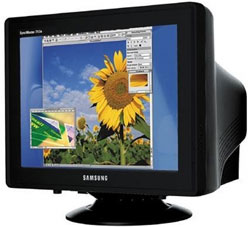
VGA CRT CONNECTOR The monitor or computer screen, but it is also commonly called "screen" is an output device through an interface, shows the results of processing.

types of monitors
We can find several types of monitors:
• CRT (Cathode Ray Tube or Cathode Ray Tube): consists of a cathode ray tube similar to those of a television
• LCD (Liquid Crystal Display, or LCD displays) used in most digital watches, calculators and the first laptops. They have as much contrast as CRTs.
• TFT (Thin Film Transistor, or Thin Film Transistor): offer higher performance in terms of color, contrast, viewing angle and response time than LCDs.
Operation
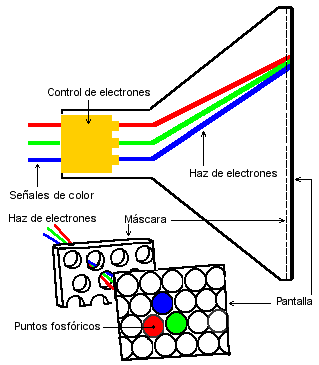
CRT: The cathode ray tube (CRT) emits an electron beam that bombards the phosphor coating lining the interior surface of the screen, standing on each pixel (graphic) so that they shine.
The beam makes a horizontal and vertical sweep, causing a trail of light of varying intensity modulated by the numerical data interpreted from the computer.
The color monitor, the CRT emits three electron beams, red green and blue RGB], impinging on each pixel of the screen to compose the image chromatic variables,

Benefits screens CRT :
play allow a greater variety of colors.
Different resolutions can be adjusted to monitor.
In the opening screen monitors no vertical moire. Disadvantages
screens CRT :
occupy more space (the more thoroughly the better geometry).
Older models have a curved screen.
Electric fields affect the monitor (the image vibrates).
To enjoy a good image adjustments required by the user.
In the opening screen monitors can be seen several power lines very fine and difficult to see across the screen horizontally, you can see white background.
Technical data, comparing himself:
In the CRT, the refresh rate is the one with the motherboard, the LCD is not always that you can send
CRTs be progressive and interlaced mode, the LCD has a different method of representation. In the CRT
lost about 1 inch size, used for fastening the tube, the CRT is pretty much occupied by the LCD.
The weight of an LCD is increased by the stand for stability, but the monitor itself weighs practically nothing.
LCDs usually require a transformer external monitor, the CRT goes all the electronics inside the monitor. In the LCD
consumption is lower, and the tension of use by the electronics as well.
In the CRT can be problems of "burn" the phosphor screen, this happens when you leave a still image for long, as the word "insert coin" in the recreation in the LCD problems may be defective pixels ( always on or always off), in addition to other damages.
The flashing of both types of screens is due to the low refresh rate, coupled with the persistence of the brightness of the phosphor, and the memory of each pixel on a CRT and LCD, respectively, to mitigate this defect.
With low refresh rate and a big time match persistence, no flashing, but the persistence of phosphorus is low and the drink is low, this problem occurs. Without emabargo this effect can cause fainting or blurred vision, to stay still on one point, the next screen refresh.
monitors Classes monitors can be classified by: For the number of colors:
Monitor Monochrome (single color) Monitor
polychromatic (color) For the signal type to display: 1 .- Digital Monitors:
CGA EGA Monochrome
2 .- Analog Monitors:
Fixed frequency multifrequency VGA
Types of monitors for resolution: TTL: is text only, they are usually green or amber.

CGA: Son de 4 colores máximo o ámbar o verde, son los primeros gráficos con una resolución de 200x400 hasta 400x600.

EGA: Monitores a colores 16 máximo o tonos de gris, con resoluciones de 400x600,
600x800.

VGA: Monitores a colores de 32 bits de color verdadero o en tono de gris, soporta
600x800, 800x120

SVGA: Super VGA Known as q increases the resolution and the number of colors from 32 to 64 bit true color, 600x400 to 1600x1800.

UVGA: not vary much from Super VGA, only increases the resolution to 1800x1200.

XGA: are high-resolution monitors, special design, graphics capability is very good. In addition the number of colors is larger. 
DIGITAL: These monitors receive data through a 9-pin connector. Each pin drives a different kind of signal. Signs include red, green and blue, red side, green secondary, secondary blue, horizontal sync, vertical and tierra.Las signals are transmitted in two states on and off. Digital monitors standard barrel has 3 electron guns in the front of the screen. These guns are called red, green and blue and emit electrons on pantalla.Cada gun shoots only at points of a particular gun. Each gun responds to signals sent to one or two pin monitor connector jack. When a signal is transmitted to pin red, red cannon shoots the red phosphor screen and the spot ilumina.La intensity of light emitted by the phosphor, is interpreted by the human eye and brain, is directly proportional to the number electron impact on rojo.Cuando point the monitor is turned on each point is in one of three states: On, off or on intense. These monitors display a fixed number of colors. The standard signal takes off a voltage from 0 to 0.8v. The signal carried on a voltage of 0.8 to 3.5V voltages are dependent on the particular monitor. The largest number These color monitors that can display are 64. This is imposed by the design of the monitor, not the monitor adapter.
ANALOG: These monitors receive data through a 15-pin connector. Each pin carries different signals. Signs include red, green, blue monitor signals zero, one and two, horizontal sync, vertical and earth.
Parameters screen Pixel: Smallest unit representable on a monitor. Dot
or (dot pitch): The point size is the space between the colored phosphors of a pixel. Is a parameter that measures the sharpness of the image, measuring the distance between two dots of the same color, it is essential to large resolutions. The smaller spot sizes produce smoother images. A monitor of 14 inches usually has a dot pitch of 0.28 mm or less. Sometimes it is different in vertical than horizontal, or is an average value, depending on the particular arrangement of colored dots on the screen, and the type of grid used to direct beams of electrons. In LCD and CRT grille opening is the horizontal distance, while the shadow-mask CRT, it is nearly diagonal. The minimum requirement now is to be of 0.28 mm. For CAD or on the design, ideally of 0.25 mm or less. 0.21 in shadow mask is the equivalent of 0.24 in opening grid.
Useful area: The screen size does not match the actual area used to represent the data.
Max Resolution: is the highest resolution or native (and only) in the case of the LCD which is capable of representing the monitor is related to the size of the screen and point size
Screen Size: is the diagonal distance of a vertex opposite the screen, which can be different from the visible area.
Bandwidth: maximum frequency is able to support the monitor or
Hz vertical refresh rate: are 2 values \u200b\u200bbetween which the monitor can display images on the screen steady.
Hz and horizontal refresh rate: similar to above but horizontally, to draw each line of the screen.
Armor: A monitor may or may not be shielded against external electrical interference and be more or less sensitive to them, so if you are blind or semiblindado take the back cover virtually all the metal in an iron tube contant with earth or ground.
Monitor Type: CRT in there may be 2 types of open grille or shadow mask.
Power Lines: are horizontal lines, which have the opening screen monitors to keep the lines that show the colors perfectly aligned, in 19 "usual usually 2, but there are also 3 lines, some small monitors even have one.
Resolutions:
resolution screen is called the number of pixels that can be located in a particular screen mode. These pixels are in turn divided by the total horizontal and the vertical.
All monitors can work with multiple modes, but depending on monitor size, some of us will be more useful than others:
In general we recommend the following: